How To Set Up A Purge Policy in GreenFolders
How To Set Up A Purge Policy in GreenFolders

*Please note that any attachments that are removed via
this policy are completely destroyed and will not be able to be recovered in
your system, so please be careful when setting up the policy.
1. Enter your Configuration in
GreenFolders:
2. Select the Data Policies option
underneath your Application.
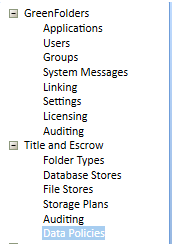
3. Select New Purge Policy to delete the attachment files you no longer need.
4. On the new Data Policy screen, enter a name, and select the timeframe you want the system to delete from.
 Please note that the options for timeframes are listed
in either days or months.
Please note that the options for timeframes are listed
in either days or months. 5. Select Save on this screen.
6. Right click on the Policy and select Execute after you have configured the policy. This policy will run and
delete any attachments older than the specified timeframe. The Folders will
remain in place, but the attachment data will be deleted.
Please contact Title iO Technical Support at 801-290-8585 ext. 2 or support@titleio.com for further assistance.